
This vignette shows how to smooth and thin WATLAS data.
# Packages
library(tools4watlas)
library(ggplot2)

# Path to csv with filtered data
data_path <- system.file(
  "extdata", "watlas_data_filtered.csv",
  package = "tools4watlas"
)

# Load data
data <- fread(data_path, yaml = TRUE)
Median smooth data
To reduce error in the position data, a basic smoother such as a
median filter can be applied. the function
atl_median_smooth() calculates the median coordinates
within a window of positions set by moving window.
# Smooth the data
data <- atl_median_smooth(data, moving_window = 5)
The resulting table overwrites the smoothed coordinates in the
columns x and y and keeps the original ones in
the columns x_raw and y_raw.
Calculate speed and turning angle
After median filtering the data, the speeds need to be recalculated. We will also calculate turning angles.
Note: the distance between median smoothed positions can be 0 and therefore will produce NAs and a warning
# Recalculate speed
data <- atl_get_speed(data, type = c("in", "out"))
Look at the data
This plot shows one example of a raw (black) and median smoothed (red) track.
# subset first tag
data_subset <- data[tag == data[1]$tag]

# subset some data to look at
from <- min(data_subset[, datetime]) + 1 * 3600
to <- min(data_subset[, datetime]) + 12 * 3600
data_subset <- data_subset[datetime %between% c(from, to)]

# Create basemap
bm <- atl_create_bm(data_subset)

# Plot
bm +
  geom_path(
    data = data_subset, aes(x_raw, y_raw),
    color = "firebrick3", linewidth = 0.5
  ) +
  geom_path(
    data = data_subset, aes(x, y),
    color = "black", linewidth = 0.5
  ) +
  geom_point(
    data = data_subset, aes(x_raw, y_raw),
    color = "firebrick3", size = 1.2
  ) +
  geom_point(
    data = data_subset, aes(x, y),
    color = "black", size = 1
  )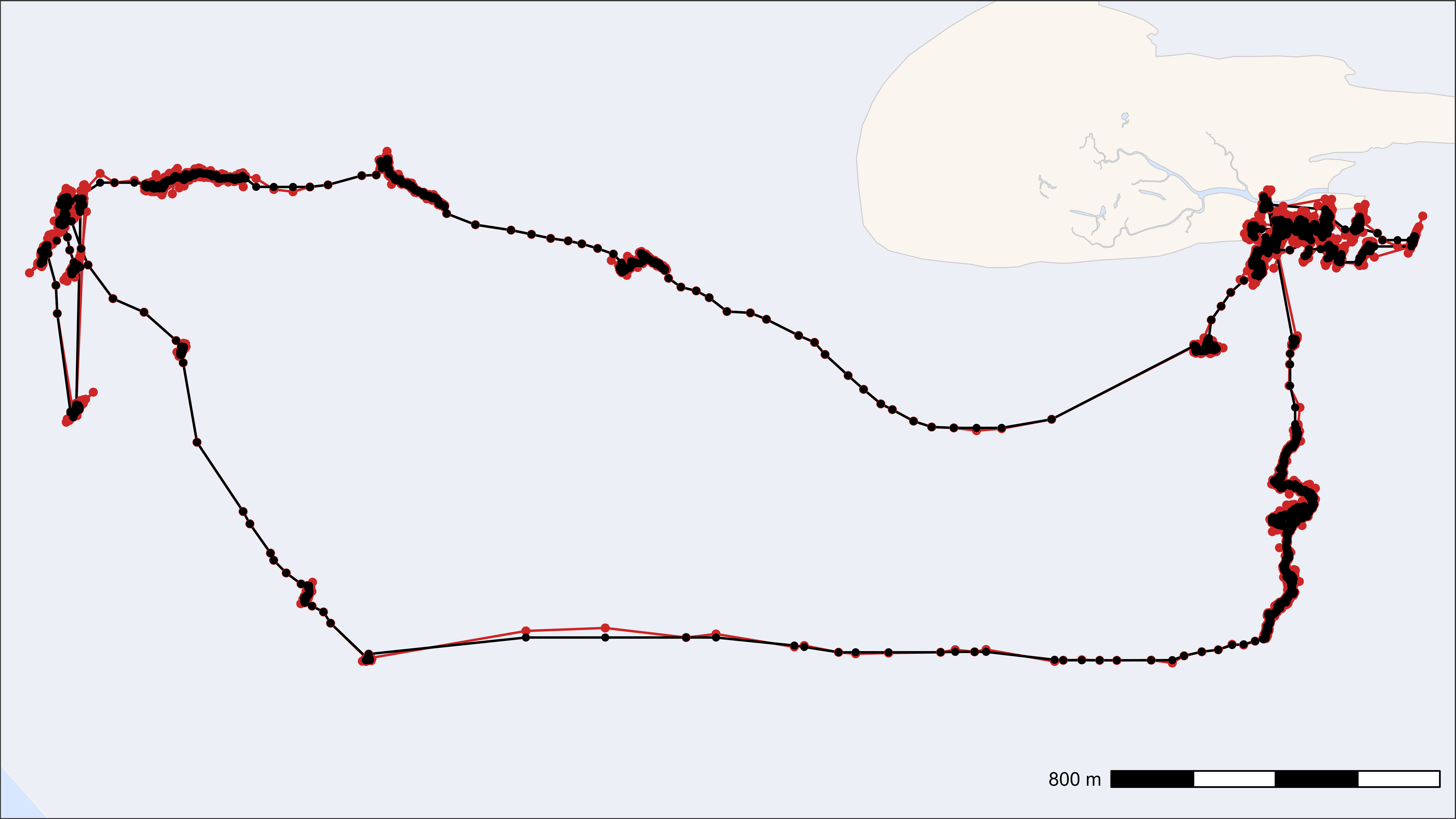
Smoothed track (black) on top of raw track (red)
Save data for the next steps
# Save data
fwrite(
  data,
  file = "../inst/extdata/watlas_data_smoothed.csv", yaml = TRUE
)
Thin data
Depending on the desired analysis, it might make sense to thin data, either by aggregation or by sub-sampling. Both methods return fixed time steps (depending on the interval).
By aggregation
Returns the mean of all columns for each time step. The additional
column n_aggregated shows how many positions were
aggregated for this position. Time and datetime are returned rounded
down to the desired interval (in seconds).
# Thin the data by aggregation with a 60-second interval
thinned_aggregated <- atl_thin_data(
  data = data,
  interval = 60,
  id_columns = c("tag", "species"),
  method = "aggregate"
)

# Show head of selected data
head(thinned_aggregated[, .(tag, time, datetime, x, y, n_aggregated)]) |>
knitr::kable(digits = 2)| tag | time | datetime | x | y | n_aggregated |
|---|---|---|---|---|---|
| 3027 | 1695438780 | 2023-09-23 03:13:00 | 650705.6 | 5902556 | 3 |
| 3027 | 1695439140 | 2023-09-23 03:19:00 | 650722.1 | 5902562 | 4 |
| 3027 | 1695439200 | 2023-09-23 03:20:00 | 650712.0 | 5902563 | 10 |
| 3027 | 1695439260 | 2023-09-23 03:21:00 | 650702.9 | 5902562 | 1 |
| 3027 | 1695439440 | 2023-09-23 03:24:00 | 650705.2 | 5902576 | 6 |
| 3027 | 1695439500 | 2023-09-23 03:25:00 | 650700.1 | 5902562 | 17 |
By subsampling
Returns the first position for each time step. The column
n_subsampled shows from how many positions this position
was sampled.
# Thin the data by subsampling with a 60-second interval
thinned_subsampled <- atl_thin_data(
  data = data,
  interval = 60,
  id_columns = c("tag", "species"),
  method = "subsample"
)

# Show head of selected data
head(thinned_subsampled[, .(tag, time, datetime, x, y, n_subsampled)]) |>
knitr::kable(digits = 2)| tag | time | datetime | x | y | n_subsampled |
|---|---|---|---|---|---|
| 3027 | 1695438802 | 2023-09-23 03:13:22 | 650705.6 | 5902556 | 3 |
| 3027 | 1695439189 | 2023-09-23 03:19:49 | 650721.0 | 5902559 | 4 |
| 3027 | 1695439201 | 2023-09-23 03:20:01 | 650723.1 | 5902564 | 10 |
| 3027 | 1695439261 | 2023-09-23 03:21:01 | 650702.9 | 5902562 | 1 |
| 3027 | 1695439477 | 2023-09-23 03:24:37 | 650702.8 | 5902562 | 6 |
| 3027 | 1695439501 | 2023-09-23 03:25:01 | 650709.9 | 5902598 | 17 |